My Forever Books
My Forever Books logoMy Forever Books
My Forever BooksMy Forever Books logoMy Forever Books
Getting started
  • How does making a book work, start to finish?
  • Do I need a computer?
  • Will any messages on my phone be deleted or changed?
  • Which apps are supported? What if mine is not listed?
  • Can I type or paste messages in by hand?
  • How far back do my messages go? What about deleted ones?
  • The messages are on an old or broken phone. Can I still make a book?
iPhone export troubleshooting
  • Can I make a manual backup instead of syncing?
  • iTunes does not recognize my phone (Windows)
  • Can I upload an iMazing or other third party backup?
Choosing your messages
  • How do I select which messages go in my book?
  • How do I include just one year, or a specific time period?
  • What do the "Select all" options do?
  • How do I find a specific message?
  • How do I review my selection and page count before saving?
Editing your book
  • How do I add a message?
  • How do I edit a message?
  • How do I delete messages?
  • How do I move a message somewhere else?
  • How do I change the date or time of a message?
  • How do I add or adjust photos?
  • How do voice messages work in a printed book?
  • What are narrations, and how do I add one?
  • How do I add a full page of my own writing?
  • How do I force something onto the next page?
  • How do chapters work?
  • How do I change the names above messages?
  • How do I control who appears on the right side?
  • The same person shows up twice. How do I merge them?
  • How do I add or remove reactions?
  • How do I change bubble colors and fonts?
  • How do I show or hide dates, times, names, and page numbers?
  • What are opening pages: dedication, table of contents, and stats?
  • What does "Load link previews" do?
Designing your cover
  • How does the cover designer work?
  • How do I use a cover template?
  • How do I add my own text and photos to the cover?
  • Can I design my cover in Canva?
  • How do I put text on the spine?
  • What do the guide lines on the cover mean?
Your books & previews
  • What can I do from My books?
  • How do I preview exactly what will print?
  • How do I order my finished book?
  • What does "Run cleanup checks" do?
  • Can I duplicate, split, or delete a book?
  • Is there a tour of the editor?
Pricing, ordering & shipping
  • What does a book cost?
  • Do book credits expire?
  • Can I upgrade from Classic to the Forever edition later?
  • Do voice pages cost extra?
  • Will years of messages fit in one book?
  • What if my conversation is longer than 800 pages?
  • How long until my book arrives?
  • I need it by a specific date. Will it make it?
  • Where is my free PDF copy?
  • My tracking has not updated. Is something wrong?
Gifts
  • Can I give this as a gift?
Account & privacy
  • I did not get my sign in link
  • I used the wrong email at checkout
  • My texts are personal. Who can see them?
  • Will my work be saved if I take a break?
Browse all topics
Getting started
  • How does making a book work, start to finish?
  • Do I need a computer?
  • Will any messages on my phone be deleted or changed?
  • Which apps are supported? What if mine is not listed?
  • Can I type or paste messages in by hand?
  • How far back do my messages go? What about deleted ones?
  • The messages are on an old or broken phone. Can I still make a book?
iPhone export troubleshooting
  • Can I make a manual backup instead of syncing?
  • iTunes does not recognize my phone (Windows)
  • Can I upload an iMazing or other third party backup?
Choosing your messages
  • How do I select which messages go in my book?
  • How do I include just one year, or a specific time period?
  • What do the "Select all" options do?
  • How do I find a specific message?
  • How do I review my selection and page count before saving?
Editing your book
  • How do I add a message?
  • How do I edit a message?
  • How do I delete messages?
  • How do I move a message somewhere else?
  • How do I change the date or time of a message?
  • How do I add or adjust photos?
  • How do voice messages work in a printed book?
  • What are narrations, and how do I add one?
  • How do I add a full page of my own writing?
  • How do I force something onto the next page?
  • How do chapters work?
  • How do I change the names above messages?
  • How do I control who appears on the right side?
  • The same person shows up twice. How do I merge them?
  • How do I add or remove reactions?
  • How do I change bubble colors and fonts?
  • How do I show or hide dates, times, names, and page numbers?
  • What are opening pages: dedication, table of contents, and stats?
  • What does "Load link previews" do?
Designing your cover
  • How does the cover designer work?
  • How do I use a cover template?
  • How do I add my own text and photos to the cover?
  • Can I design my cover in Canva?
  • How do I put text on the spine?
  • What do the guide lines on the cover mean?
Your books & previews
  • What can I do from My books?
  • How do I preview exactly what will print?
  • How do I order my finished book?
  • What does "Run cleanup checks" do?
  • Can I duplicate, split, or delete a book?
  • Is there a tour of the editor?
Pricing, ordering & shipping
  • What does a book cost?
  • Do book credits expire?
  • Can I upgrade from Classic to the Forever edition later?
  • Do voice pages cost extra?
  • Will years of messages fit in one book?
  • What if my conversation is longer than 800 pages?
  • How long until my book arrives?
  • I need it by a specific date. Will it make it?
  • Where is my free PDF copy?
  • My tracking has not updated. Is something wrong?
Gifts
  • Can I give this as a gift?
Account & privacy
  • I did not get my sign in link
  • I used the wrong email at checkout
  • My texts are personal. Who can see them?
  • Will my work be saved if I take a break?
Help centerDesigning your cover

What do the guide lines on the cover mean?

The guides mark the spine, the safety area for important content, and the bleed or wrap zone at the outer edge.

Toggle "Show guides" in the toolbar to see the print zones on your cover. The guide key in the corner explains each line:
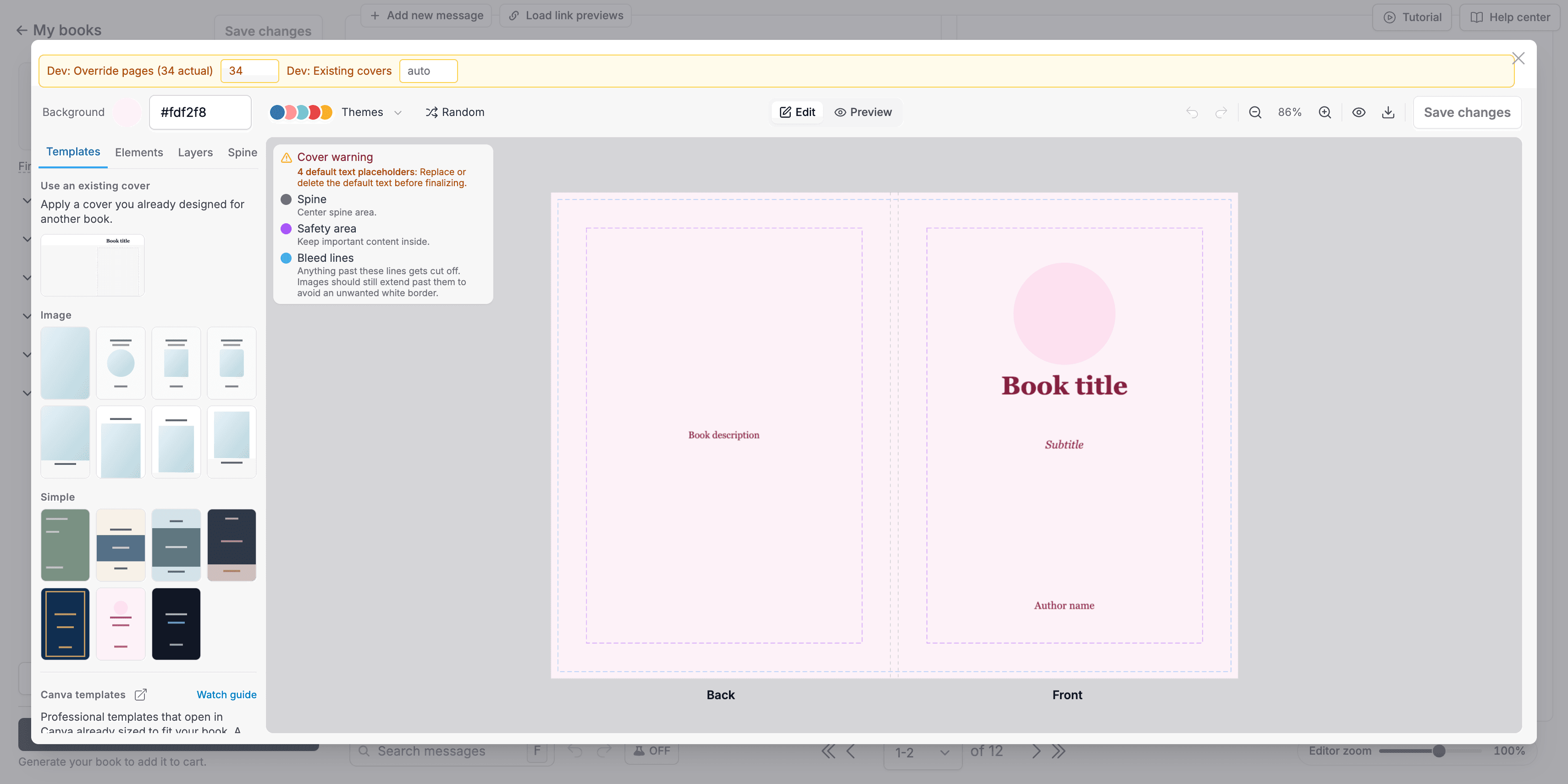
The cover canvas with spine, safety area, and bleed guide lines visible
  1. 1

    Spine: the vertical lines in the center mark where the front and back covers meet. The lines are for reference and never print.

  2. 2

    Safety area: keep all text and important content inside this zone so nothing gets trimmed or wrapped away.

  3. 3

    Bleed lines (paperback): anything past these lines is trimmed off in printing. Extend background colors and images past them so your cover has no white edges.

  4. 4

    Wrap lines (hardcover): content past these lines wraps around to the inside of the cover instead of being trimmed.

  5. 5

    Linen wrap books add two more: the content boundary marks the safe outer edge before the fold, and the fold lines show where the dust jacket flaps wrap inside.

PreviousHow do I put text on the spine?NextWhat can I do from My books?

© 2026 My Forever Books LLC. All rights reserved.

PricingContactPrivacyTerms